


Adobe Firefly: AI Generator
4.4614.00 Reviews
App Specs
- Version
- 26.06.26
- Updated On
- License
- Free
- Downloads
- 1,000,000+
- Developer
- Adobe
- Categories
- Art & Design
- Platform
- Android
Screenshots



 Analysis by AppCompare
My main impression of Adobe Firefly: AI Generator is that it makes visual experimentation approachable, but it works best as a starting point rather than a replacement for careful design work. I like it when I need to explore an idea quickly or give a rough concept a visual shape. If I need precise control over every detail, I still want a more traditional editor beside it.
A quick way to move from an idea to a visual direction
The useful question with a creative AI app is not just whether it can make something attractive; it is whether the result helps you decide what to make next. Firefly’s appeal, in my experience, is that it lowers the effort involved in trying a visual direction. You can begin with a plain-language idea, look at what the tool produces, then refine your thinking instead of staring at a blank canvas.
That makes it handy for early-stage work: a mood-board image, a rough campaign concept, or a few visual options to discuss with a colleague. I would treat the generated result as material to assess, not a finished answer. The more specific your brief is about subject, mood, setting, and composition, the easier it is to judge whether an output is useful. If the prompt is vague, the results may be attractive but difficult to apply.
For example, if I were preparing a post for a neighborhood event, I could use Firefly to explore a few possible visual moods before settling on the layout and wording in a separate design step. That is a more realistic strength than expecting one prompt to deliver a polished, publication-ready campaign. The app can help me get unstuck; I still need to check that the image fits the audience, message, and format.
Where it fits among creative tools
Firefly sits in the broad art and design space, but it serves a different purpose from a conventional drawing app. A drawing tool gives me direct control of each mark; an AI generator lets me describe a direction and assess the interpretation. Those approaches can complement each other, but they are not interchangeable. If I already know exactly what I want to draw, manual tools may be faster and more predictable.
It also differs from a template-first design app. Templates are useful when I want a dependable structure and need to replace text, colors, or images. Generative work is more open-ended, which is helpful during brainstorming but can take more rounds of prompting and selection. I would choose a template when consistency and speed matter most, and Firefly when I want to explore an image or visual concept that does not fit a ready-made layout.
Adobe makes the app, and that may be appealing if you already work with Adobe tools. Still, I would not assume that every person needs an Adobe workflow to benefit from it. The core question is whether generating and refining visual ideas suits the way you work. Firefly makes the most sense as one tool in a broader creative process, rather than as the only place to plan, design, and finish every asset.
Worth Reading Before You Choose

Flipboard Shows What News Apps Must Do Beyond the Feed

Switching to Android Auto Means Rethinking Your Driving Routine

Google Calendar Makes a Crowded Week Easier to Manage

Ludo King Makes the Most of the Minutes Between Plans

Baby Panda World Brings Quick Play to Modern Phones, but Its Game Library Feels Busy

ESPN’s Live Game View Makes Following Close Games Easier
Getting to Know Adobe Firefly
First things first, Adobe Firefly: AI Generator is all about making creativity accessible and fun. It’s designed for both newbies and seasoned pros, which is pretty cool because it doesn’t matter where you’re starting from. The app uses AI to help you create artwork, design elements, and even enhance photos. And it does this all while keeping things intuitive and not overwhelming.
When I first opened the app, I was greeted with a sleek, user-friendly interface. Navigating through the features was a breeze. I didn’t feel like I was getting lost in a sea of options. Instead, everything was nicely laid out, making it easy to jump right into creating something.
Features That Make You Go "Wow!"
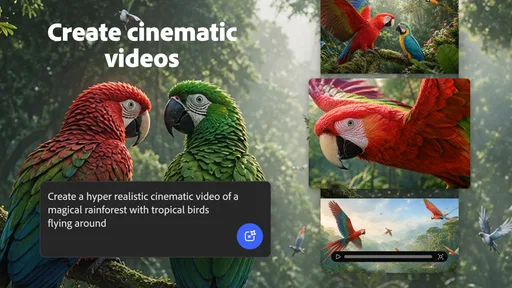
One of the first features I tried was the AI-powered art generator. You can input your ideas or themes, and the app suggests various design concepts. It’s like having a brainstorming partner who never runs out of juice. The suggestions were not only relevant but also sparked new ideas I hadn’t considered.
Another handy feature is the photo enhancer. Got a picture that’s almost perfect but needs a little touch-up? Firefly’s got your back. The AI automatically adjusts and enhances your photos, bringing out the best colors and details. It’s like magic, but real.
And let’s not forget the design templates. Whether you’re working on social media graphics, posters, or even business cards, Firefly offers a bunch of customizable templates. You can tweak them to fit your needs, which saves a ton of time if you’re on a tight schedule.
Small workflow choices that make a difference
A practical way to use the generator is to separate exploration from finishing. I would first try prompts that change one thing at a time, such as the setting or mood, rather than rewriting the whole idea after every result. That makes it easier to notice which words are actually steering the image. Once I find a promising direction, I can move to a layout or editing tool for exact spacing, typography, and final checks.
I also find it worth thinking about the intended crop before generating. A visual meant for a square social post has different needs from a wide banner or a portrait image. Even a strong concept can become awkward if the important subject sits where a crop would remove it. I would describe the subject’s placement in the prompt and leave some breathing room around it when the image needs to fit a particular design.
For photo enhancement, I would keep an untouched copy of the original and compare the result at normal viewing size, not only zoomed in. An automatic adjustment can make colors feel livelier, but “more vivid” is not always more accurate. For a personal snapshot, that may be a pleasing improvement; for a product image or a record of a real scene, faithful color may matter more than extra punch.
Who will get the most from it
I would recommend Firefly to people who often need visual inspiration but do not consider themselves illustrators: small-business owners planning a post, students shaping a presentation, hobbyists trying out concepts, or designers looking for a quick alternative direction. It can also suit someone who wants to experiment on a phone rather than begin with a full desktop workflow. Its role is especially clear when the first obstacle is “I don’t know what this could look like.”
It is less suited to people who need exact, repeatable artwork or detailed control from the first stroke. A brand asset with strict proportions, a technical diagram, or a carefully matched product image may call for a conventional graphics editor and a human-led process. I would also skip it if I only need to resize an image or place text on a familiar layout; a simpler editor or template-based tool may get that routine job done with fewer creative decisions.
One everyday scenario makes the distinction clear. Suppose I have a community class to promote and only a rough idea of the image: welcoming, hands-on, and suitable for a phone screen. I could use Firefly to test visual directions, choose one that feels right, then build the final post elsewhere with the correct event details. That workflow uses the app for what it does well—opening up options—without trusting generated imagery to supply accurate dates, names, or other essential information.
Access, cost, and practical expectations
The app is free to install, and its in-app purchases range from $4.99 to $49.99 per item. I would explore the free experience first and only consider a purchase if I knew which part of my workflow it would improve. A price shown for an in-app item does not tell me whether I will need it for a particular project, so I would check the purchase details in the app before committing. This is a tool to try for occasional creative work, not something I would pay for automatically just because I use it once.
It is rated for Everyone, has more than a million installs, and holds an average rating of 4.6 from around 20,000 ratings, with 451 written reviews. Those figures suggest it has reached a broad audience, though popularity cannot guarantee that its style or workflow will suit me. It was released on June 17, 2025, and version 25.11.13 requires Android 10 or later. Adobe is the developer, and the app’s place in its creative range is a useful reason to consider it if I already use Adobe tools, not a reason to assume it will replace them.
One limitation I keep in mind is that a generated image can look convincing while still missing the point of a brief. I would review every result for visual oddities, confusing details, and anything that could mislead someone about a real person, place, or product. AI output can also take several rounds to get near a specific intention, so “quick” does not always mean “one prompt and done.” If the task needs dependable accuracy, I would use generated imagery cautiously and finish with direct editing or a more controlled source.
My Experience with Firefly
As someone who loves experimenting with design but doesn’t always have the time, I found Firefly to be a game changer. I spent a solid afternoon just playing around with the features. The AI suggestions were surprisingly spot-on, and the ease of use meant I didn’t have to spend hours learning how to use the app. I was able to create a few social media posts and even a mock-up for a project I’ve been working on.
One thing that stood out was how responsive the app is. It didn’t lag or crash, which is a huge plus in my book. Plus, the seamless integration with other Adobe products meant that I could easily transfer my creations for further editing if needed.
Making a sensible choice before you start
If you are deciding whether to install it, think about the work you actually want it to do. For playful experiments, concept sketches, or a quick visual to help explain an idea, I think it is an inviting place to begin. For finished work where every visual detail must be controlled, I would plan on pairing it with a traditional editor rather than relying on generation alone. That expectation keeps the app useful instead of frustrating.
I would also go in with a willingness to revise prompts and judge results. Clear descriptions help, but the process still involves selection: sometimes the technically polished option is less appropriate than a simpler one that better supports the message. If you enjoy that back-and-forth, Firefly can make creative exploration feel accessible. If you would rather place every element yourself and know exactly how it will behave, another kind of design app will probably feel more comfortable.
Wrapping It Up
All in all, Adobe Firefly: AI Generator is a fantastic tool for anyone looking to inject some creativity into their projects without the hassle. Its user-friendly interface, combined with powerful AI features, makes it a must-have for designers, artists, and anyone in between. Whether you’re looking to create stunning visuals or simply enhance your personal photos, Firefly makes it happen with ease.
So, if you’re on the hunt for an app that offers a creative boost and is a joy to use, give Adobe Firefly a shot. It might just become your new favorite tool in your digital arsenal.
Pros
- User-friendly interface for beginners
- Supports multiple creative outputs
- Integrates well with Adobe Suite
- Fast processing of AI-generated content
- Regular updates with new features
Cons
- Requires Adobe account for full access
- Limited offline functionality
- Subscription model can be costly
- Occasional bugs with complex designs
- High system requirements for optimal use
FAQs for Adobe Firefly: AI Generator
What is Adobe Firefly: AI Generator?
Adobe Firefly: AI Generator is an innovative app designed to enhance your creative process through AI-powered tools. It allows users to generate unique graphics, designs, and art using advanced algorithms. Whether you're a professional designer or a creative enthusiast, this app promises to transform your ideas into stunning visuals with ease.
Is Adobe Firefly suitable for beginners?
Yes, Adobe Firefly: AI Generator is suitable for beginners. The intuitive interface and guided tutorials make it accessible for users with varying levels of experience. The app provides features that help new users understand and utilize AI tools effectively, ensuring a smooth learning curve while exploring creative possibilities.
What platforms is Adobe Firefly available on?
Adobe Firefly: AI Generator is available on both Android and iOS platforms. This ensures that users can access the app on a wide range of devices, including smartphones and tablets. By providing cross-platform availability, Adobe Firefly allows users to create and edit projects seamlessly, regardless of their device preference.
Does Adobe Firefly require an internet connection?
While Adobe Firefly can be used offline for accessing basic features and previously downloaded resources, certain functionalities, such as cloud saving and access to the latest AI updates, require an internet connection. To fully utilize all features and ensure your projects are backed up, having an internet connection is recommended.
Are there in-app purchases or subscription fees?
Adobe Firefly offers both free and premium versions. The free version provides access to essential tools and features, while the premium subscription unlocks advanced options and additional content. Users can choose based on their needs, and prices are competitive, reflecting the extensive capabilities provided by the premium package.


